by Liam
No doubt you will have noticed results on search engines with extra features around the usual title tag, meta description and URL. From breadcrumbs to sitelinks to FAQs, these ‘rich snippets’ are usually achieved by implementing structured data or SCHEMA Markup. To help you get your result attracting similar attention on the SERPs, we’ve produced an introductory guide on how to easily code structured data for your website.
What is structured data?
Structured data is a form of code which helps search engines determine the content on your website and present it in marked up styles on their results pages. From question and answer boxes that sit beneath your search listing (FAQ Schema) to local business listings which show your opening hours, contact details and more when searchers type in your brand name.
For a comparison that’s similar, consider a dictionary definition of a word:

Here, you can see how the dictionary helps you identify information about the word (verb, UK, pronunciation) before presenting the definition.
Where a dictionary provides humans with a quick way of understanding what type of word it presents, structured data does the same for search engines.
However, the complication lies in the fact that there are many more variables when it comes to what is included on your website.
For example, your site could consist of product reviews, prices, videos, imagery, blog-posts and a whole host of other content and media.
Check out the Google Search Gallery to see the different classifications of markup and the rich snippets you can achieve after implementation.
Quick note: there are occasions where Google won’t choose to display your structured data as a rich snippet. This is generally to do with quality or the presence of other structured data on the same page.
More on Structured Data and SCHEMA
A search engine will crawl your site and try pick out the relevant content for the search query in question. To speed up this process, structured data uses code to identify specific information related to your page and content.
For example, at the start of a typical blog post, you’ll see page title code in the HTML:
<title>How To Find And Acquire Featured Snippets | Salience</title>
In a blog post that has structured data, you’ll also see something like the following:
"@type": "BlogPosting",
"headline": "How To Find And Acquire Featured Snippets”
This code tells the search engine exactly what it’s looking at without the need for further inspection. More importantly, it means the search engine can present your result in an enhanced format as it has extra data to work with.

In the above example, you can see how the search result has star ratings and additional information such as the number of pages, the weight, and the publisher. Aside from its benefit for the user, this upgraded presentation also helps attract their attention and take up more real estate on the results page.
Taking a look at the code for this page, you’ll see a number of itemprop additions to the code. This is called MicroData, a form of structured data.
This form of data is a little outdated now and it’s recommended to just JSON-LD. That’s because this sits in the head of your page rather than within the body. This helps crawlers find the information even faster, which is why Google has started promotes the use of JSON-LD for structured data above other types.
Check out an example of structured data for a food recipe below:
<script type="application/ld+json">
    {
      "@context": "https://schema.org/",
      "@type": "Recipe",
      "name": "Party Coffee Cake",
      "author": {
        "@type": "Person",
        "name": "Mary Stone"
      },
      "datePublished": "2018-03-10",
      "description": "This coffee cake is awesome and perfect for parties.",
      "prepTime": "PT20M"
    }
    </script>
The above code is simply placed in the header of your HTML code. You can do this manually or automatically with the use of site plugins.
Don’t be put off by the code either. While many site owners tend to stay away from code as much as possible, the good news is that when it comes to structured data there are a number of online tools which generate the code for you. This means you don’t need knowledge of code or web development for creating structuring your data and acquiring rich snippets.
Google’s Structured Data Markup Helper
Google’s structured data markup helper automates the process of identifying which parts of your content need marking up with SCHEMA code. To start, you’ll need to identify the type of media you are marking up. The tool has options to generate code for the most common web page categories including:
- Articles
- Events
- Local businesses
- Restaurants
- Book reviews
- Films
- Products
- Software applications
- Data sets
- Job postings
- Question and answer pages
- TV episodes
For more information on what types of rich snippets this mark-up could result in, check out our guide to the best rich snippets and how to get them.
Once you’ve identified the type of page or media type you are marking up, you’ll need to enter the URL in question. The tool will then present the page making each page element clickable. You’ll then be able to choose what that element is and generate the code with the right ID tags.
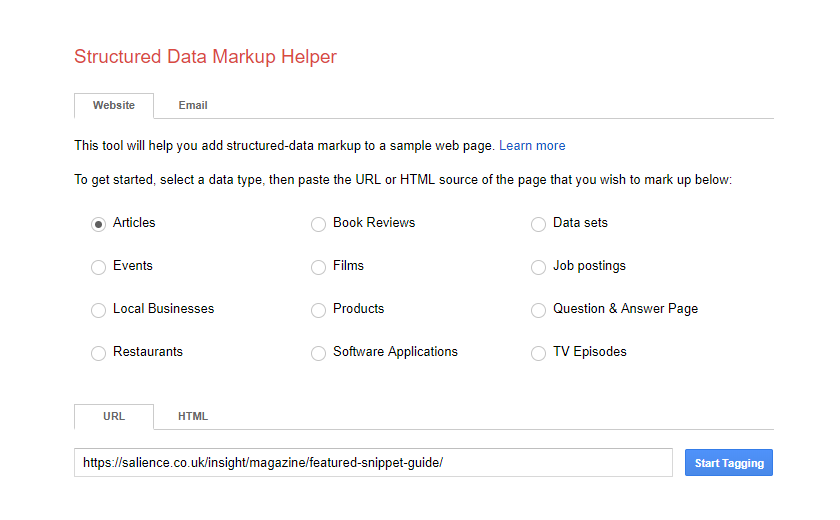
In this example, we’ve chosen to mark-up an article. In this second stage, you can simply move through the article, clicking each element and matching it to the relevant ID tag in the drop down menu. Once complete, simply hit create html and the tool will present the code you need to add your site.
[salience_cta heading=”Rich results.” copy=”We know the schema to improve your CTR” image=”” background=”https://salience.co.uk/wp-content/uploads/Challenge-Us_Background.png” link=”https://salience.co.uk/contact/” button_copy =”Your Free Audit”]
How to create SCHEMA code with Google’s Structured Data Markup Helper
- Identify the content type you want to create code for
- Enter your URL (or HTML if your page isn’t yet live)
- Click ‘Start Tagging’.
This will then present a page similar to the below, with a preview of the page. You will be able to highlight each element on the page and then use the dropdown menu to start creating your SCHEMA markup. For further guidance, follow the steps below.

- Highlight a relevant element on your page
- Choose the identifier from the drop-down menu
- Check the My Data Items column to the right and make sure you’ve marked up the right element
- Repeat steps 4-6 until you’ve tagged all the relevant properties
- Once complete, click create HTML.
- Using the drop-down menu decide whether to use JSON-LD or Microdata
- Copy and paste the relevant code to your page code.
It’s worth noting that if you use microdata, you’ll need to copy and paste the highlighted code to the HTML of your page. If using JSON-LD, you’ll need to add the script block to the head section of your HTML. Clearly, it’s easier to implement JSON-LD. And as it’s the preferred type of structured data, it’s always recommend using this.
There are however plenty of SCHEMA types and structured data formats which you can’t create with Google’s Structured Data Helper. To help, we’ve created a post on Schema for eCommerce sites which gives you the code you’ll need. All you need to do is go through and fill in the details.
Using WordPress Plugins for SCHEMA Markup
If you’re using a CMS like WordPress, it might be worth looking into using a SCHEMA plugin service rather than adding the code manually. There are plenty on the market from paid services to free. Of course, the paid versions offer better features but don’t discount the free ones. If you’re on a budget you’ll still get the option for some basic SCHEMA markup features including shortcodes, custom icons, pro / con lists and more. Each tool is relatively easy to use, so take a look at our favourite 5 schema plugins below:
- Schema Pro – https://wpschema.com/
- Schema App – https://www.schemaapp.com
- WP Review Pro – https://wpleaders.com/go/wp-review-pro/
- WP SEO Structured Data Schema – https://wordpress.org/plugins/wp-seo-structured-data-schema/
- Let’s Review WordPress Plugin – https://codetipi.com/products/lets-review/