by Martyn
Sometimes your data in Google Analytics is not always as authentic as it seems at first glance.
One of the bigger data integrity issues that can occur is traffic that comes from spiders and robots to your website. This traffic is not legitimate but can often appear otherwise.
Bot traffic is not always malicious, but it is useless and adds no value in terms of Google Analytics; in fact, having this in your account can skew your real data significantly.
There is no catch-all for eliminating ‘ghost’ or ‘spam’ traffic in Google Analytics, but here we’ll look at some of the more common ways of spotting these pesky bleeders in your account and some quick tips on how to turf ‘em out.
How do I spot bot traffic?
Most of the time, fake traffic has attributes that make it easy to spot.
As I alluded to in a previous article, a sudden increase in direct or referral traffic would be a huge warning sign that there’s been some foul play.
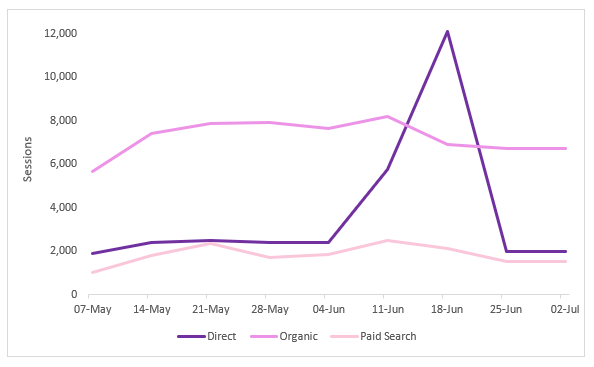
This direct traffic spike is needy and requires your attention
Of course, that’s not to say this is where the investigation ends – this traffic may be legitimate as a result of marketing activity or seasonality. However, if this increase is unexpected you would want to follow this up with some investigatory work.
One of the starting points I generally use during an investigation is the ‘Hostname’ report (Audience > Technology > Network > Hostname)
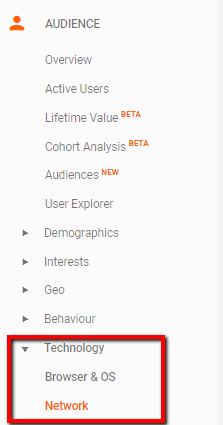

Try this out for yourself. Are there any strange looking domains in here? Ideally, the only domain in this report should be the domain of your website(s) – anything other than this is likely going to be illegitimate.
Another good dimension to use is ‘Network Domain’ – again, check if there are any network provider domains here that look suspicious. ‘Amazonaws.com’ is a well-known bot crawler that I’ve seen wreak havoc across many accounts.
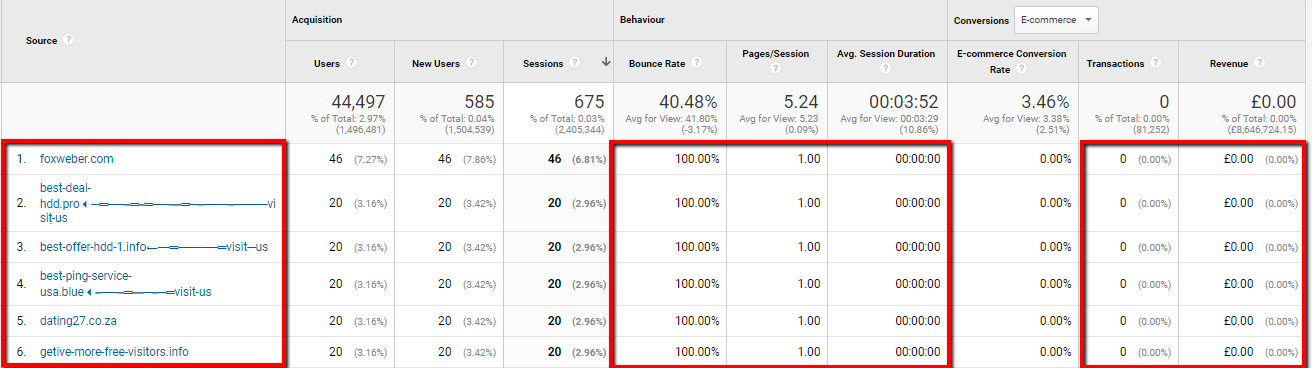
Spam traffic can be sussed out using metrics too. Engagement stats will look peculiar: extremely high bounce rates, low pages per session and average session duration metrics, like in the screenshot below, are a good indicator of bots. After all, the intention of the bot is just to crawl the site and leave its data behind. It would not interact with the site as a real person would.
E-commerce/Goal Conversion data is also a good reference point for this; if a particular dimension has a high amount of sessions but absolutely no conversions, this could well be spam.

Real bot traffic, caught in the wild
You can also see traces of spam in the Referral channel. Referral spam is a bit more sleuth-y than real bots as they attempt to mask their identity by using fake referrer headers – usually the name of the domain that they want to promote. Go to your list of referrals (Acquisition > Channels > Referrals), sort the bounce rate column low to high and you will likely see some suspicious domains, like the ones below:
Mmm, delicious spam
Fake traffic is not always obvious, but try using all of the points above in combination to catch it in the act. Check through your list of sources for unusual looking domains, apply secondary dimensions for extra analysis and look at those engagement metrics closely.
[imagecta title=”No more bots & a full Analytics set-up” buttontext=”Work with us” buttonlink=”https://salience.co.uk/google-analytics-agency/” imageid=”878″]
How do I get rid of bot traffic?
Now we’ve identified some bot traffic let’s not sit on our hands.
A while back, Google introduced a feature to Analytics called ‘Bot Filtering’. Ticking this checkbox should prevent data coming in from every possible bot and spider and eliminate your spam traffic completely.

The End.
Not really…
Although this feature will help a little bit, it’s by no means a catch-all. I’ve found that even with accounts that have this enabled, bot traffic can still run riot.
Fortunately, Google Analytics allows you to filter out unwanted data and this certainly the most effective way. Follow the steps below and say goodbye to that junk:
This filter will only include traffic coming from your domain and should eliminate rogue data coming from spammy hostnames.
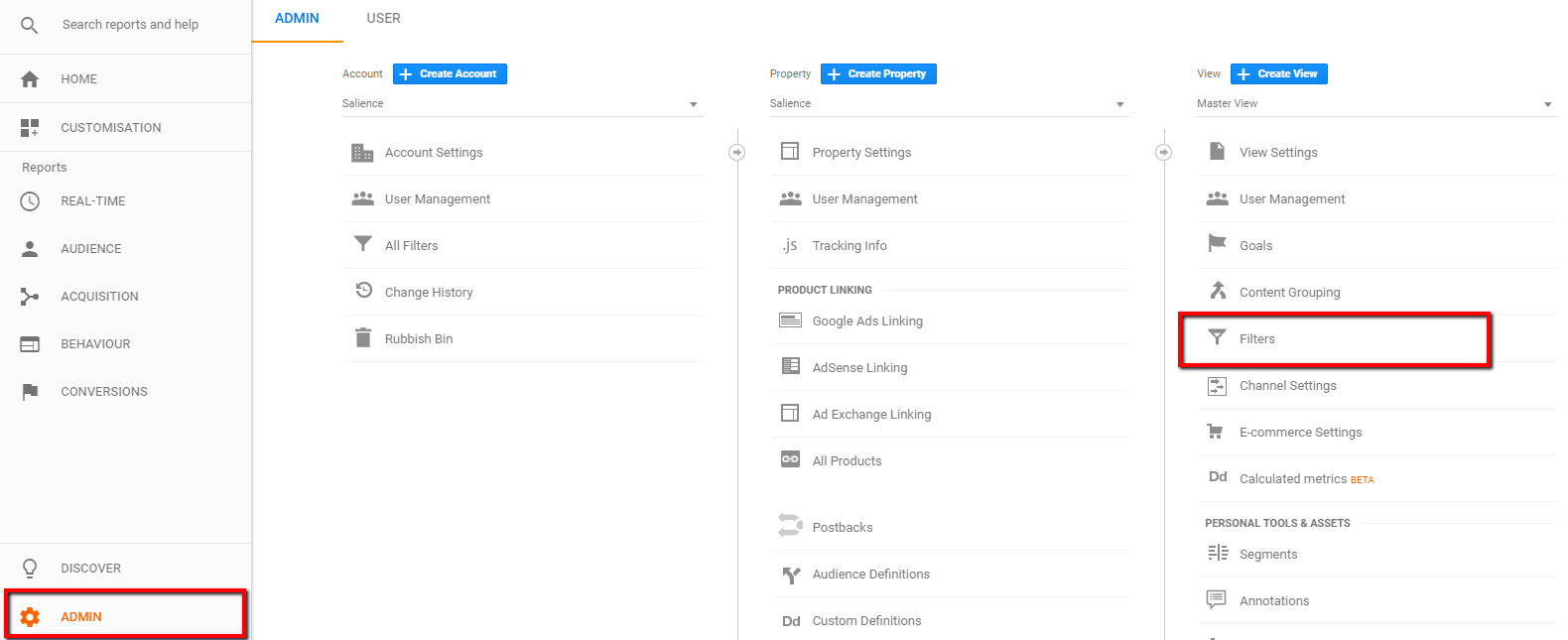
To set up a filter in GA, go to ‘Admin’ > ‘Filters’
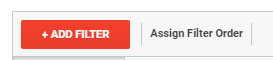
Click ‘+ Add Filter’
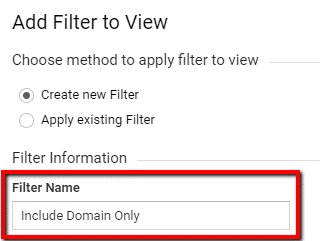
Name your filter something distinguishable, like the below:
Choose ‘Custom’ as the filter type, select ‘Include’ and from the resultant drop-down select ‘Hostname’. Insert the name of your domain(s) here. Press save and you’re all set!
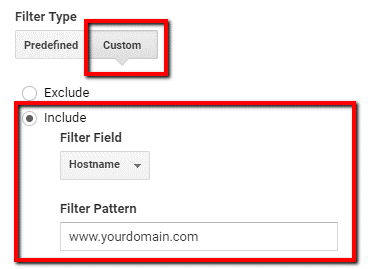
You can filter certain data from a whole list of different dimensions. In our earlier examples, we saw traces of referral spam. We can get rid of this in the same manner by tweaking the filter, like the below.
This time we want to be explicit with what we want to see excluded from Google Analytics. Choose ‘Exclude’ and from the filter field dropdown select ‘Referral’.
When you’re entering multiple domains into the filter pattern field, you will need to use the pipe symbol ‘|’ in between each domain you enter. This is a regular expression and is a useful aspect to learn when it comes to Google Analytics. We’ll save this for a rainy day.
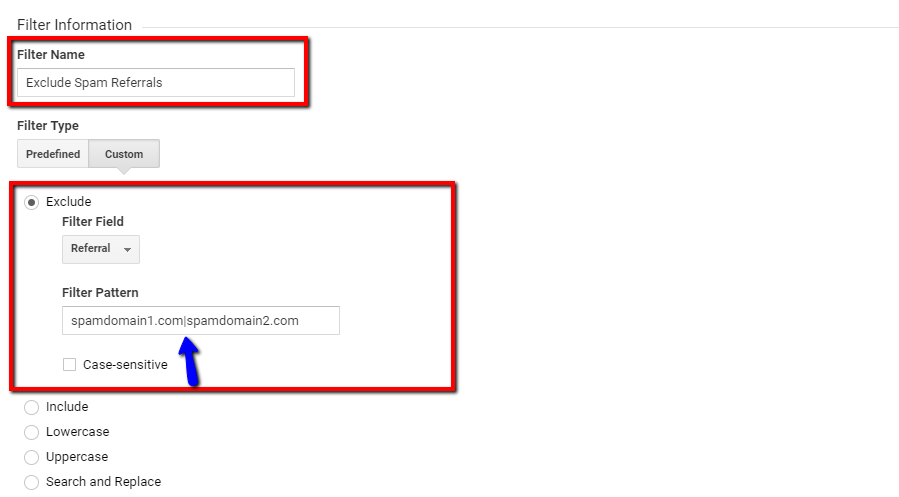
The above filters can be tweaked dependant on what attribute of spam/bot traffic you find. Although filtering the data out of your account is the best course of action, there are few points to note here:
- As this is a filter with manual conditions, you’re going to have to update this list regularly. As best practice, I’d do a scan for bot/spam traffic in your account every month and add any new domains you find to the filter we’ve just created.
- Do NOT add these domains to the ‘referral exclusion’ list, rather than filtering them out. All this will do is attribute your referral spam to the ‘Direct’ channel and will not clean your account of spam.
- As best practice apply these filters to a test view first to ensure they are done correctly. If you don’t have a test view in your account…make one!
Until Google finds a more robust method of eliminating this kind of traffic from Analytics, the above methods will have to suffice. Get in the habit of checking regularly for signs of bots/spam in your account and take the appropriate steps to eliminate them; it only takes a few minutes and it’ll help keep your data clean, accurate and spam free!
[imagecta title=”We know what’s what when it comes to Analytics.” buttontext=”Challenge us” buttonlink=”https://salience.co.uk/google-analytics-agency/” imageid=”878″]
FAQs
What is a bot?
A bot (often referred to as a crawler, spider or user agent) is an autonomous program used by search engines (such as Google) and software providers to perform tasks and gather information around the web. Search engine bots then pass information gathered through algorithms for indexing.
When you search for something via Google, Bing or similar, the results come from that index. This is why you’ll often hear tech SEOs refer to indexation issues of a site. While we don’t want bot traffic to appear in analytics in the same way as a user would, it’s important not to block bots from accessing your site if you care about getting organic traffic.
What are the most common bots around the web?
According to Device Atlas, the most common bots are Googlebot (including all variants, such as mobile, desktop & images), Bingbot, Facebook, Yahoo!, Sogou, Proximic & Baidu Spider.
What are the different types of Google crawlers?
There are 15 crawlers or user agents belonging to Google. These are APIs-Google, AdSense, Adsbot Mobile Web Android, Adsbot Mobile Web, Adsbot, Googlebot Images, Googlebot News, Googlebot Video, Googlebot (desktop), Googlebot (smartphone), Mobile Adsense, Mobile Apps Android, Feedfetcher, Google Read Aloud.
What are the most common bots around the web?
According to Device Atlas, the most common bots are Googlebot (including all variants, such as mobile, desktop & images), Bingbot, Facebook, Yahoo!, Sogou, Proximic & Baidu Spider.