by Shannan
Most SEO audits fail in the same way. They list everything and rank nothing. You get a long PDF, a red health score, and no idea where to start.
Not sure where your site stands? See our SEO audit services.
We have worked in search since 2009, and audits sit at the start of every SEO campaign we run.
This guide explains what an SEO audit is, what it should cover, and the order we check things in. It ends with a checklist you can download and use on your own site.
In short
- An audit answers three questions. Can search engines reach your pages? Do the right pages match what people search for? Is your site trusted enough to be shown and cited?
- Order matters. If Google cannot index a page, its title tag is irrelevant. We start with indexation and work outwards.
- A free tool report is a starting point. A full audit adds your own data, context, and priorities.
- AI search visibility is now part of every audit we run. AI Overviews and AI Mode draw on the same index as Google’s blue links.
What is an SEO audit?
An SEO audit is a structured review of how well search engines and AI search tools can find, understand, and trust your website. It checks crawling, indexing, technical health, content, and links. It then turns what it finds into a prioritised list of fixes, each with an action and a reason, tied to traffic and revenue.
Google describes this work plainly. In its guide to hiring an SEO, the first service it lists is a “review of your site content or structure”. That review is the audit.
A good audit does three things a crawl alone cannot:
- It uses your real data. Search Console, GA4, and server logs show what is happening. A crawler shows what could happen.
- It explains the cause. “Soft 404s on discontinued products” is more useful than a raw error count.
- It ranks the fixes. Some issues cost you revenue today. Others are tidy-ups. The audit says which is which.
What does an SEO audit include?
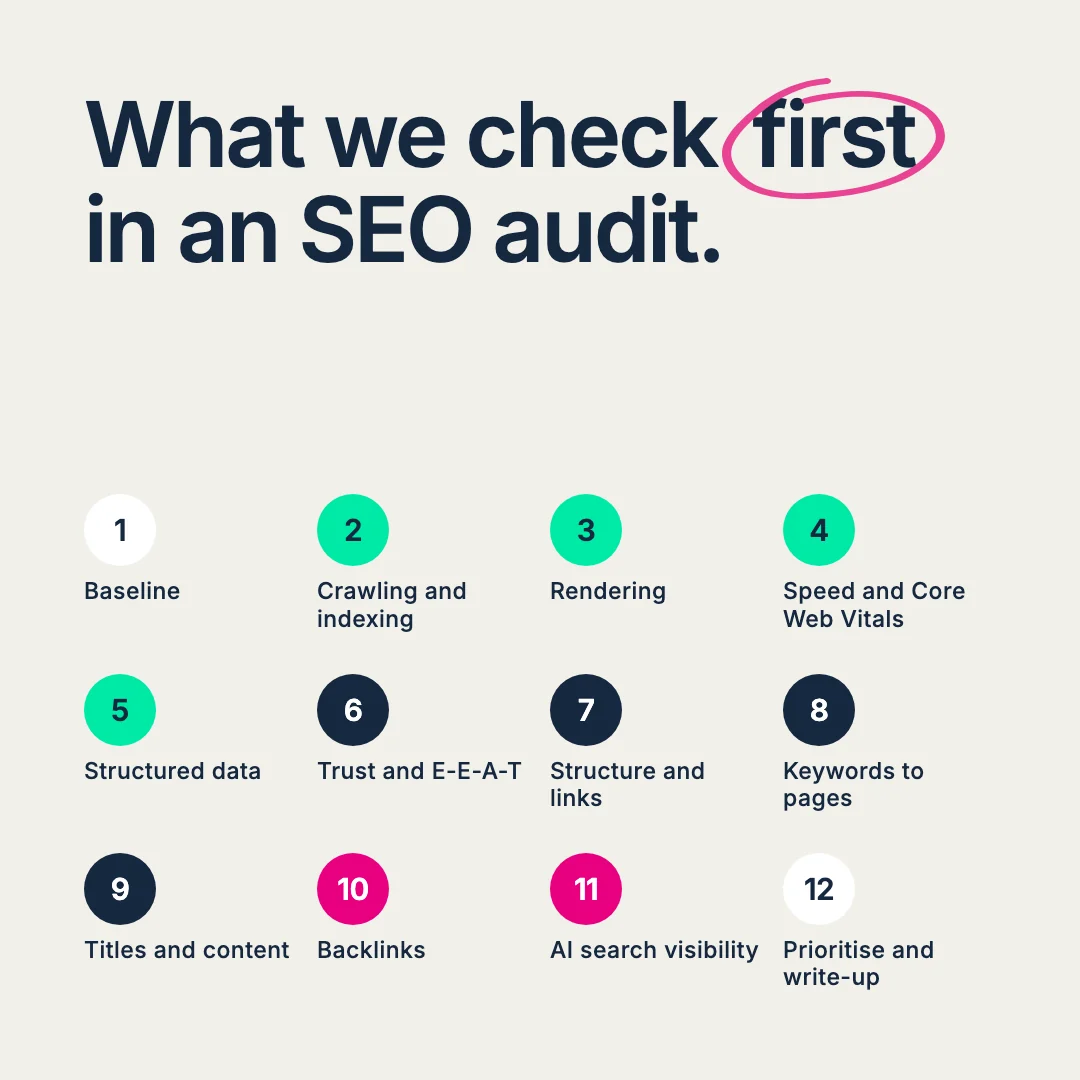
A full SEO audit covers seven areas. We check them in this order, because a problem higher up can block every fix below it.
| Area | What it checks | Where the evidence comes from |
|---|---|---|
| Crawling, indexing, and rendering | Robots.txt, noindex tags, sitemaps, canonicals, redirects, status codes, JavaScript rendering | Search Console, a site crawler, and server logs |
| Technical health | Core Web Vitals, mobile experience, HTTPS, structured data, product feeds | PageSpeed Insights, Rich Results Test, Merchant Center, crawler |
| Content quality and E-E-A-T | Helpfulness, depth, authorship, trust signals, thin or duplicate pages | Manual review against Google’s guidance |
| Site structure | Click depth, internal links, breadcrumbs, orphan pages, pagination | Crawler, internal link reports |
| On-page and keyword targeting | One target page per query, titles, H1s, category copy, cannibalisation | Search Console queries, rank tracking, keyword research |
| Links and authority | Referring domain trend, link quality, dead pages that still hold links | Backlink index, Search Console links report |
| AI search visibility | AI crawler access, AI Overview presence, brand mentions and citations | AI visibility tracking, Search Console, manual checks |
When should you run an SEO audit?
The most common triggers are:
- Before a migration, redesign, or replatform.
- After a drop in organic traffic, rankings, or revenue. Start with our guide on how to diagnose ranking drops.
- After a Google core update lands on your sector.
- When you bring in a new agency or in-house SEO, so everyone works from the same baseline.
- Before a large content or category build.
- When AI search tools recommend your competitors and leave you out.
How often depends on how fast your site changes. A small site that rarely changes can run a full audit once a year and monitor in between.
A large ecommerce site that adds products every week needs rolling checks, quarterly at least.
Inside our retainers, each audit area runs on a schedule, and we re-run the relevant checks after any big change, such as a new theme or a migration.
Schöffel Country more than doubled its organic revenue after a migration.
We audited the new site before launch, then checked the live site against it once it went live. Organic revenue rose 127% after the move.

Why we check things in this order
A crawler can flag hundreds of issues in an afternoon. The skill is knowing which ones matter first.
Our rule is simple. Fix what stops Google from reaching a page before you fix what is on the page. A perfect title tag does nothing on a URL that Google cannot index.
So we start with indexation and rendering, then speed, then structured data, then trust signals. Only then do we move to site structure, keywords, and on-page copy.
Links and AI search come last, because they build on everything above them. For retailers, we check product feeds early, because they feed several search surfaces at once.
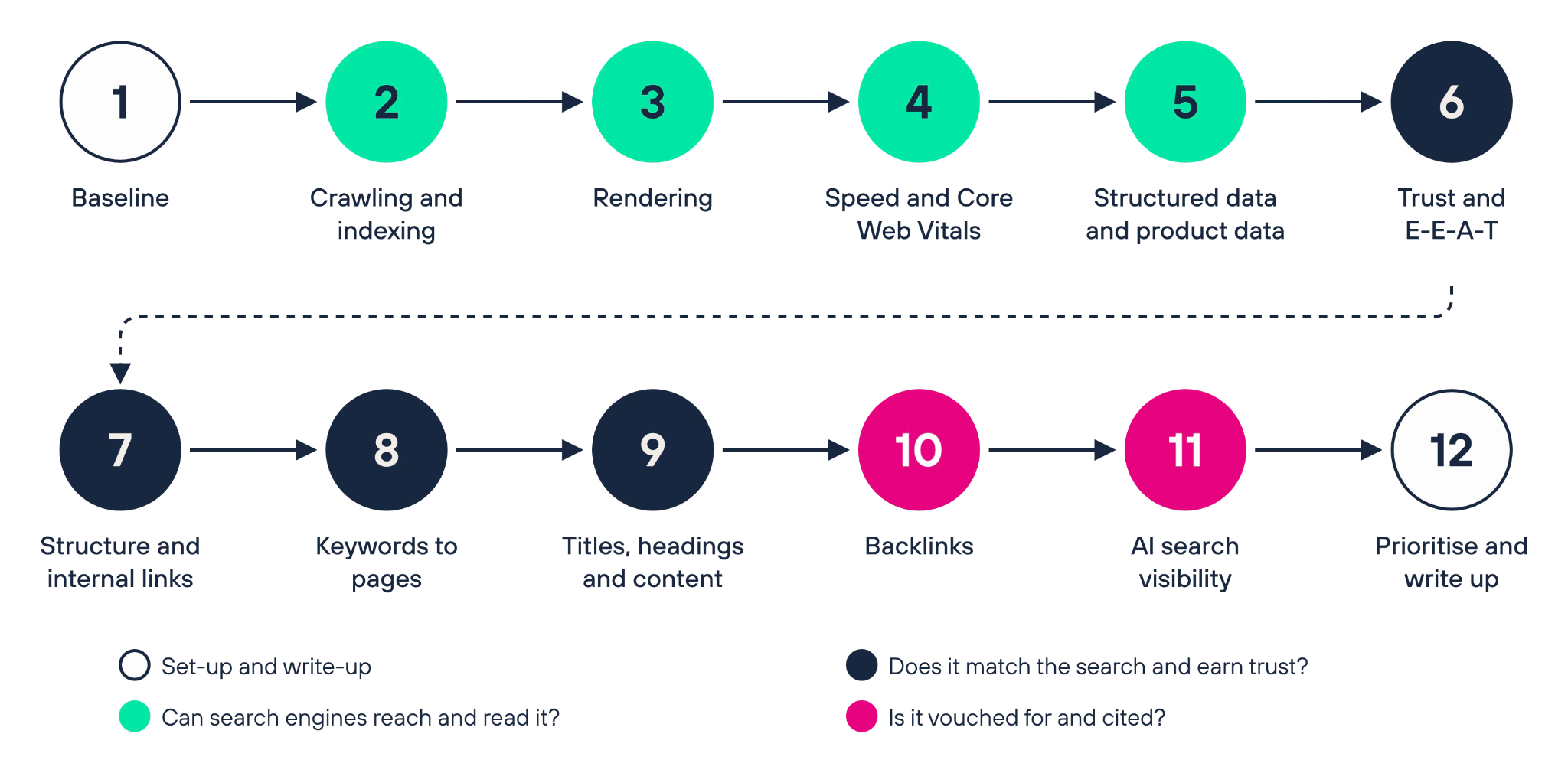
How to do an SEO audit: our process
Step 1: Agree on the goal and set a baseline
Start with the business question. Are you trying to grow revenue from a category, recover lost traffic, or protect rankings through a migration? The goal decides where you dig deepest.
Then set a baseline from your own data:
- Organic clicks, impressions, and queries from the Search Console Performance report.
- Organic sessions, orders, and revenue from GA4.
- Any tracking changes in the period, such as a consent update or a new attribution model. These change the numbers without changing performance. Our post on common Google Analytics data errors lists the usual causes. Filter out bot traffic in GA4 too, or your baseline will be inflated.
Note every site event too: migrations, redesigns, big content changes. They explain most of the lines on your charts.
Step 2: Check that Google can crawl and index your important pages
This is where we find the most expensive problems. A key category page set to noindex costs more than every missing alt tag on the site.
What we look for:
- Robots.txt rules that block important sections. Robots.txt controls crawling. Google says it is “not a mechanism for keeping a web page out of Google“. Use noindex for that.
- Indexing status in the Page indexing report. Check why key pages sit under “Not indexed”.
- Soft 404s and server errors. Pages that say “not found” but return a 200 code, and 5xx errors.
- Redirects. Temporary 302 or 307 redirects that should be permanent 301s, plus redirect chains and internal links that point to redirected URLs.
- Canonical tags. Each indexable page should carry a self-referencing canonical, with no stray parameters. Google treats redirects and rel=”canonical” as strong signals, per its canonical URL guidance.
- XML sitemaps should list only indexable URLs that return a 200 code. Google uses sitemaps to crawl your site more efficiently, so a sitemap full of redirects wastes that.
Use the URL Inspection tool to spot-check templates. For large sites, server logs show where Googlebot spends its time. Our log file analysis guide explains how to read them.
Step 3: Check what Google sees once the page renders
Google crawls, renders, and then indexes JavaScript pages, in that order. If your navigation, product copy, or internal links appear only after JavaScript runs, Google may never see them.
Compare the raw HTML with the rendered page. Check that:
- Main content, navigation, and internal links are in the raw HTML.
- Accordions and tabs hold their text in the HTML, so it can be read without a click.
- Paginated pages use crawlable links, not script-only buttons.
This matters more as AI search grows. Vercel’s study of AI crawler traffic found that most major AI crawlers, including OpenAI’s and Anthropic’s, do not render JavaScript (December 2024). Content that only appears after scripts run is invisible to them. Our explainer on how Google reads your site goes deeper.
Step 4: Review speed and Core Web Vitals by template
Test page types, not single pages. Your product, category, article, and home templates each behave differently.
Google’s Core Web Vitals set three “good” thresholds, measured at the 75th percentile of page loads:
| Metric | Measures | Good |
|---|---|---|
| Largest Contentful Paint (LCP) | Loading | 2.5 seconds or less |
| Interaction to Next Paint (INP) | Responsiveness | 200 milliseconds or less |
| Cumulative Layout Shift (CLS) | Visual stability | 0.1 or less |
Use field data from real users where you have it, and lab data to find the cause. Our PageSpeed Insights guide explains the difference, and our post on page experience signals covers what each metric means.
Check mobile first, because Google uses the mobile version of a site’s content for indexing and ranking. Read more in our post on the mobile-first index.
Step 5: Validate structured data and product data
Structured data helps search engines understand what a page is: a product, an article, or an organisation. Check that each page type carries the right markup, with no errors or missing required fields.
Google recommends the Rich Results Test for validation and the rich result reports in Search Console for monitoring. Our guides to adding structured data and schema for ecommerce sites cover implementation.
For retailers, check the product feed in Merchant Center at the same time. Prices, availability, and product attributes should match the page. Mismatches cost you free listings as well as paid ones.
Step 6: Review trust signals and E-E-A-T
E-E-A-T stands for experience, expertise, authoritativeness, and trust. Google says that “of these aspects, trust is most important“.
Work through Google’s own “Who, How, and Why” questions on helpful content. We check:
- Who wrote the content, with bylines that lead to real author pages.
- How it was made, including any use of AI.
- Why it exists: to help a reader, or to catch a keyword.
- Contact details, returns and delivery pages, reviews, and company information.
- Factual errors and out-of-date advice.
Google also states it has no preferred word count. Depth should match the question. Our piece on what Google means by high-quality content unpacks the guidance.
Step 7: Map site structure and internal links
Internal links tell Google which pages matter and how they relate. We check:
- Click depth. Key categories and services should sit a few clicks from the homepage.
- Orphan pages with no internal links pointing at them.
- Broken internal links returning a 404, and links that point to redirects.
- Breadcrumbs that follow the real site hierarchy.
- Anchor text that describes the target page.
- Links between page types, such as articles linking to the categories they support.
Our internal linking guide is written for content teams, so it is a useful handover once the audit is done.
Step 8: Match keywords to pages and find cannibalisation
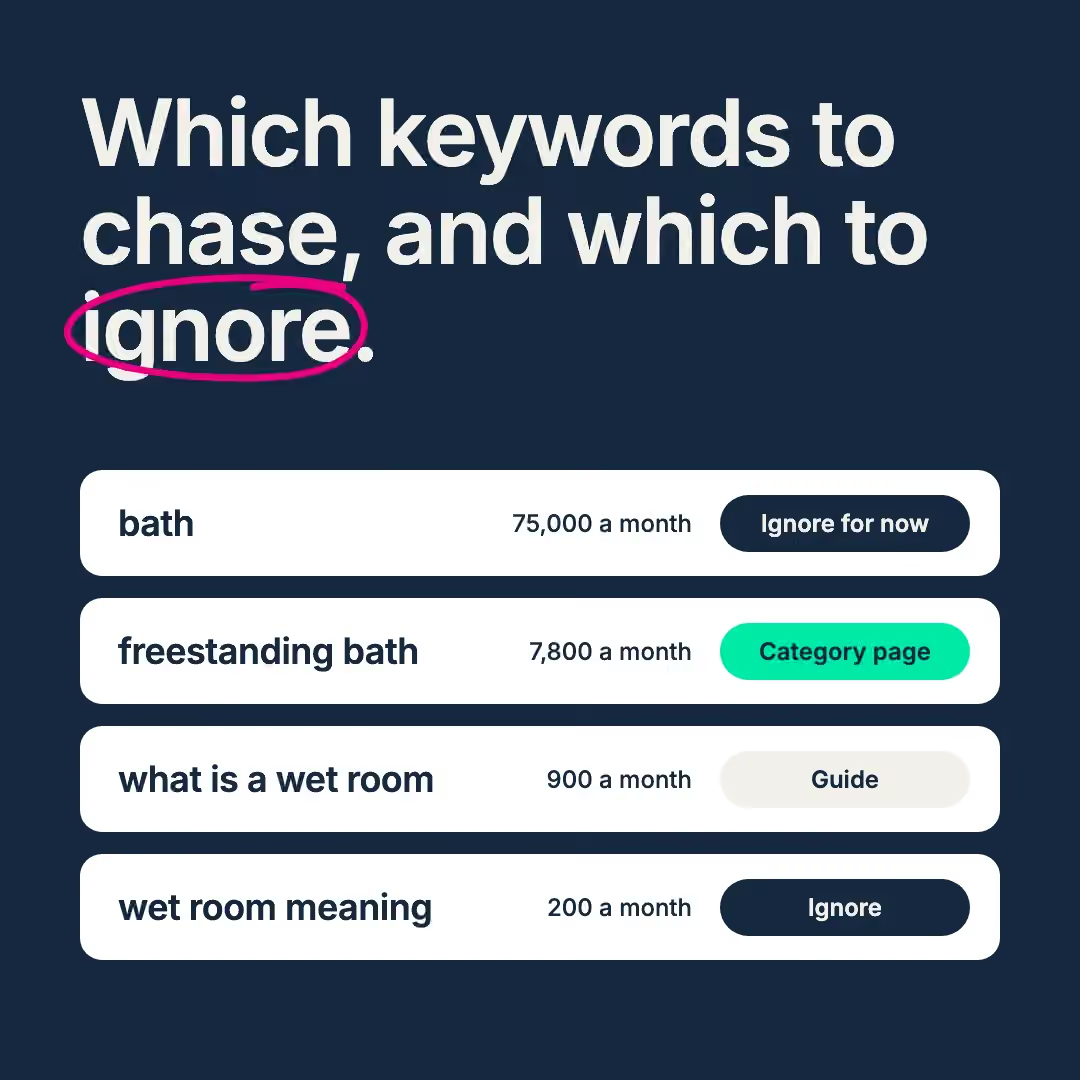
Every important query should have one clear target page. When two or more of your URLs compete for the same query, Google swaps between them and neither ranks as well as one strong page.
Build a keyword-to-URL map:
- List your priority queries by topic or category.
- Pull the URLs that rank for each one from Search Console.
- Flag queries where several URLs share impressions.
- Decide each URL’s fate: keep, merge, create, or remove with a 301.
This step also shows gaps: queries with demand and no page to serve them. Our view on topical authority explains why those gaps matter. When the map shows missing pages, our content marketing team plans and writes them.
Step 9: Review titles, headings, and category content
Now the on-page work earns its place. Check site-wide and by template:
- Title tags that carry the searcher’s main phrase and read well as a link.
- One H1 per page, with a logical H2 and H3 structure below it.
- Meta descriptions that match the page and give a reason to click.
- Category and service copy that answers what buyers ask before they buy.
- Product pages with unique names and descriptions, and a plan for out-of-stock items.
On large sites, fix templates before individual pages. One template change can fix thousands of URLs. Our post on taking back control of high-SKU sites shows how a small team can manage that.
Copy that ranks still has to convert, which is where CRO and UX testing come in.
Step 10: Audit your backlinks
Links still tell search engines that other sites vouch for you. A link audit looks at:
- Referring domain trend over two years, against your main competitors. Our free industry reports benchmark brands’ search visibility by sector, which is a useful place to find who those competitors are.
- Your top link-earning pages, and whether they pass value to commercial pages.
- Dead pages that still hold links. A 404 with good links is an easy win. Reinstate it or 301 it to the closest match.
- Link patterns that break Google’s rules. Bought links, excessive link exchanges, and optimised anchor text in guest posts all count as link spam under Google’s spam policies.
Treat third-party link data as a signal. Every backlink tool estimates the web from its own crawl. When you find gaps, digital PR is how we earn links that hold their value.
Step 11: Check your AI search visibility
AI Overviews, AI Mode, ChatGPT search, and other assistants now answer many questions before a click. An audit should show whether they can reach, read, and cite you.
Google says there are “no additional requirements to appear in AI Overviews or AI Mode“. The page needs to be indexed and eligible for a snippet. So steps 2 to 10 already do most of the work. On top, we check:
- AI crawler access. Review robots.txt rules for OAI-SearchBot, which OpenAI uses for ChatGPT search. Google-Extended controls Gemini training and grounding, not AI Overviews.
- Your AI settings in Search Console. Google’s generative AI control can take a whole site out of AI Overviews and AI Mode. Check nobody has switched it on by mistake, and check for stray nosnippet tags.
- AI Overview presence on your priority queries, and whether you are cited or only mentioned.
- Who gets cited instead of you. Often a publisher or comparison site, which points to a PR or content gap. Our SERP real estate study shows how much of the page these features now take up.
- Rankings versus traffic. If clicks fall while your rank holds steady, check whether an AI Overview now sits above you. That is a different problem from a ranking drop.
Measure carefully. Search Console counts AI feature traffic inside its overall Web results, a gap we cover in our take on Google I/O 2026 and SEO measurement. GA4 also undercounts AI referrals, because many arrive without a referrer. Our research on the downstream impact of AI visibility shows why mentions show up later as brand searches.
This work is often called GEO, short for generative engine optimisation. Our AI search visibility team runs these checks as standard.
Step 12: Prioritise and write up the findings
An audit is only as useful as its write-up. We write every finding in the same four-part format:
| Priority | Action | Examples or data | Why it matters |
|---|---|---|---|
| High | Return a true 404 or 301 for discontinued product URLs that show a “not found” message | A list of affected URLs in the linked spreadsheet | Soft 404s waste crawl time and can keep dead pages in the index |
To keep the report readable, put one issue in each row and keep URL lists in a linked spreadsheet.
How to prioritise SEO audit findings
We grade each finding High, Medium, or Low.
| Priority | What it means | Typical examples |
|---|---|---|
| High | The biggest likely effect on traffic or revenue, or it prevents harm | Key pages not indexed, sitewide noindex, broken redirects after a migration |
| Medium | Clear benefit, smaller reach or more effort | Cannibalising category pages, slow templates, missing product schema |
| Low | Good housekeeping | Long title tags on old posts, minor heading issues |
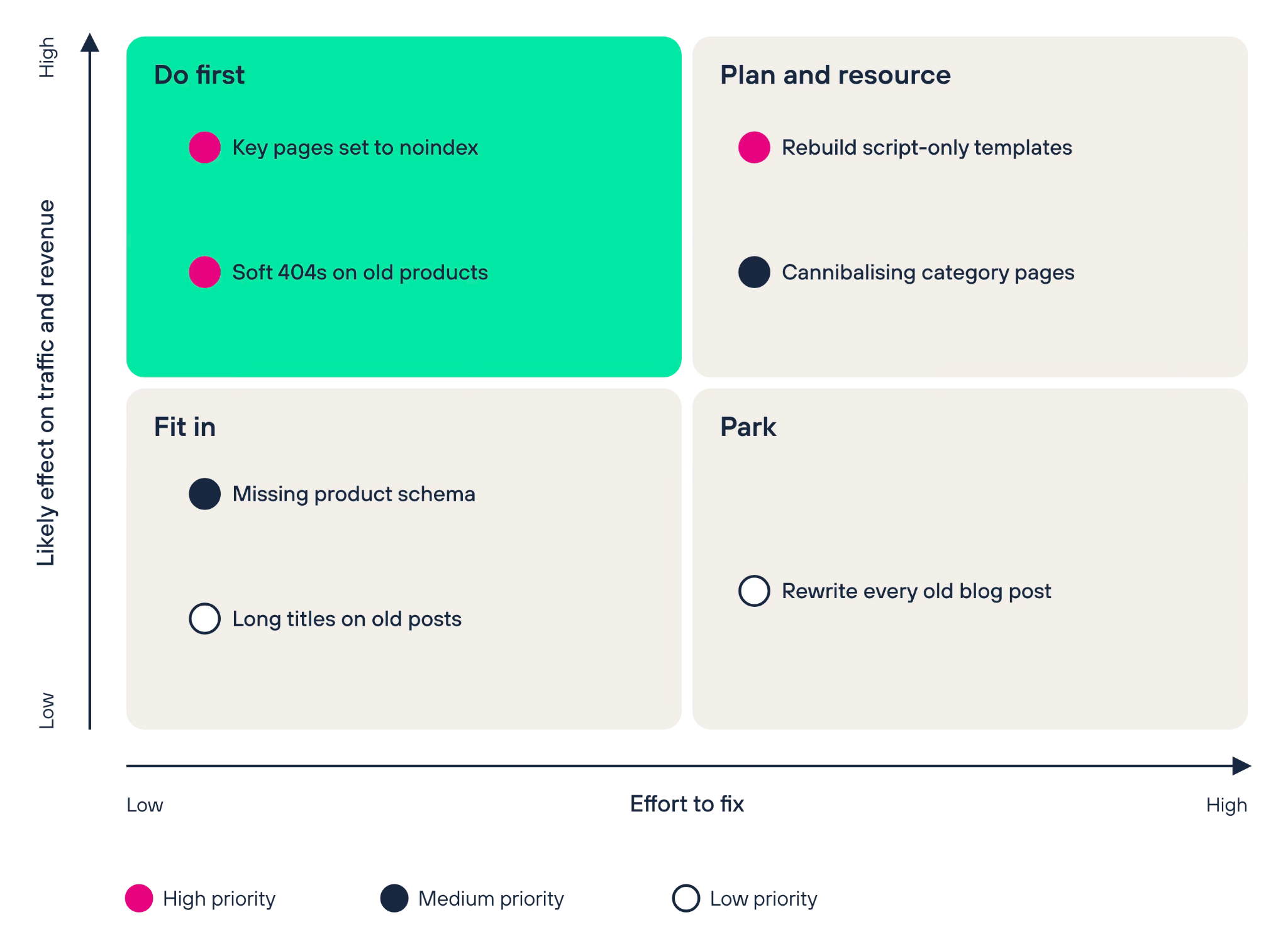
Priority order and delivery order are two different lists. A High item that needs a full rebuild may ship after three quick Medium fixes. Weigh the effort, the owner, and the developer queue, then agree on the order with whoever ships the work.
Plotting each finding by effect and effort makes that conversation quicker:
SEO audit tools you need
No single tool runs a full audit. These are some of the tools we use, and what each one adds.
| Tool | What it adds to the audit |
|---|---|
| Google Search Console | Indexing status, queries, clicks, Core Web Vitals, structured data reports, URL Inspection, AI settings |
| Google Analytics 4 | Organic sessions, conversions, and revenue by landing page |
| PageSpeed Insights | Field and lab speed data by URL |
| Rich Results Test | Structured data validation |
| A site crawler | Status codes, canonicals, redirects, titles, internal links, rendering |
| Server logs | Where Googlebot and AI crawlers spend their time |
| A backlink index, such as Ahrefs | Referring domains, lost links, competitor comparisons |
| Rank and AI visibility tracking, such as SEOmonitor | Rankings, share of clicks, AI Overview presence |
Free SEO audit tools versus a full SEO audit
Free audit tools are worth running. They catch broken links, missing tags, and slow pages in minutes. They also have limits.
| Free tool report | Full SEO audit | |
|---|---|---|
| Data | A crawl of public pages | Crawl plus Search Console, GA4, logs, and backlink data |
| Context | Generic rules for every site | Your goals, sector, competitors, and site history |
| Priorities | A health score and a long list | High, Medium, and Low, tied to revenue |
| Cause | Shows the symptom | Explains why it happens and who fixes it |
| AI search | Often a checkbox | Crawler access, citations, and AI Overview presence on your queries |
Use a free tool to spot obvious problems. Use a full audit when you need to decide where to spend time and budget.
What happens after an SEO audit?
The audit is the start of the work. Here is what we do next:
- Turn findings into tickets. Each one gets an owner (developer or content team) and a status.
- Agree on the delivery order with the people who ship the work.
- Report progress monthly, showing what is fixed and what is waiting.
- Measure against the baseline from step 1, using the same data sources.
- Re-run the checks after any site change, such as a theme update or migration.
If tracking is part of the problem, our Google Analytics team can fix the measurement first, so the results are clear.
Download the SEO audit checklist
Use this checklist to run your own audit, in the same order we use. Print it, or tick it off on screen.
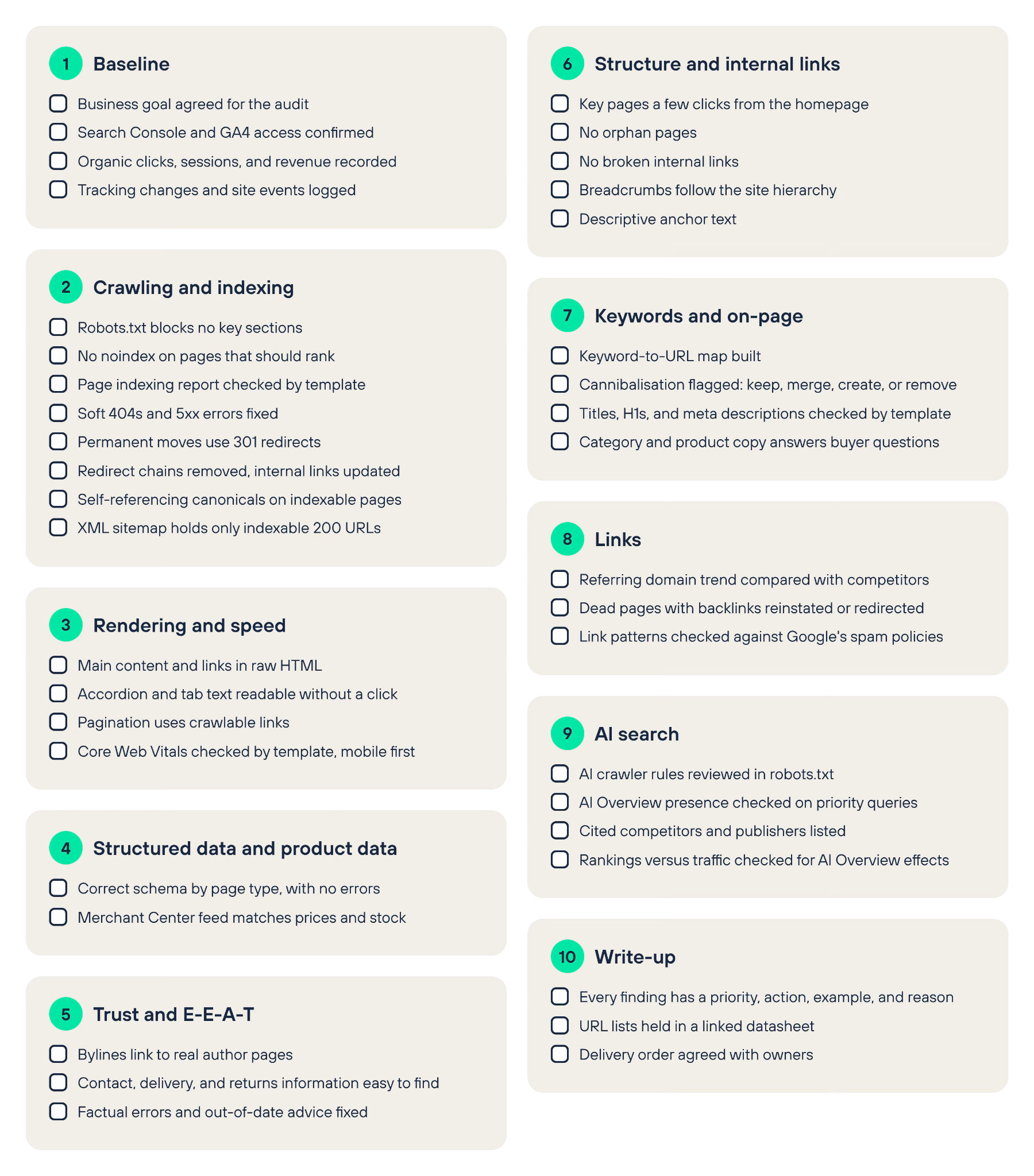
Download the SEO audit checklist (PDF)
SEO audit FAQs
How much does an SEO audit cost?
It depends on the size of the site, the number of templates, and how deep each area goes. A small brochure site needs far less work than an ecommerce site with faceted navigation, several countries, or a migration underway. Ask any provider what is in scope, which data they will use, and whether the price includes a prioritised action plan.
Your first SEO audit with us is free. We review your site’s crawling and indexing, technical health, content, links, and AI search visibility, then show you which fixes to make first.
Want our help with them? We add a proposal and costs. If not, the findings are yours to keep. Book your free SEO audit.
How long does an SEO audit take?
A quick check with a free tool takes minutes. A full audit takes longer, because it needs data access, a full crawl, manual review, and a written action plan. The biggest factors are site size, the number of templates, and how quickly access to Search Console, GA4, and logs is granted.
Our free SEO audit is over 40 hours of cross-team work, presented to you in one hour.
Our technical, content, and digital PR specialists work on it together. We present about five working days after you give us access. Every audit follows the same steps:
- We confirm access to your data.
- We crawl the site and pull your Search Console and GA4 data.
- We review the findings by hand.
- We write up each issue with a priority, an action, examples, and the reason it matters.
How often should you do an SEO audit?
Run a full audit at least once a year, and after any major change, such as a migration, redesign, or core update. Large sites that change every week need rolling checks on a set schedule.
Can ChatGPT do an SEO audit?
Partly. An AI assistant can review a page you paste in, suggest title tags, or summarise a crawl export. It cannot see your Search Console or GA4 data unless you share it, and it does not crawl your whole site the way a search engine does. It can also state errors with confidence. Use it to speed up analysis, then check what it says against your own data.
Is there a free tool that can perform an SEO audit of my website?
Yes. Google Search Console, PageSpeed Insights, and the Rich Results Test are free and use Google’s own data. Many crawlers and SEO platforms also offer free audits with page limits. They are a good first look. They will not prioritise fixes against your business goals.
Which tool is best for an SEO audit?
Start with Google Search Console, because it shows how Google sees your site. Add a site crawler for technical checks, GA4 for revenue, and a backlink tool for links. The best audits combine several sources.
What is the difference between a technical SEO audit and a full SEO audit?
A technical SEO audit looks at how your site is built. It checks crawling, indexing, rendering, speed, structured data, and site architecture.
A full SEO audit covers all of that, then adds three areas:
- Content: a review of your content and keyword targeting.
- Links: a link audit to inform digital PR.
- AI search: a check of where AI tools mention or cite you, which feeds our GEO work.
We’ll recommend the right audit once we’ve seen your site.
What should an SEO audit report include?
A summary of the biggest issues, a baseline of current performance, and a prioritised list of findings. Each finding should have an action, examples, and a reason it matters. The report should also say who owns each fix.
Want a second pair of eyes on your site? Get a free SEO audit
If you’d rather not run the audit yourself, our SEO team can do it with you. We tie every finding to traffic and revenue you can check, and we work through the fixes with your team.
For retailers, our ecommerce SEO specialists start with the product templates.
Our audits have shaped some of our strongest results.
Dreams’ SEO campaign started with a technical audit.
Our technical SEO audit made over 50 recommendations. Keyword and content gap work followed, built on what the audit found.

We found the Salience audit to be very thorough, with plenty of detail around specific areas to address. The team were friendly and knowledgeable, not at all pushy and answered our queries satisfactorily.
Head of Marketing, Festive Lights

Talk it through with Owen.
Book a free discovery call. We’ll look at your site together and show you what we’d check first.